Program RACI Matrix
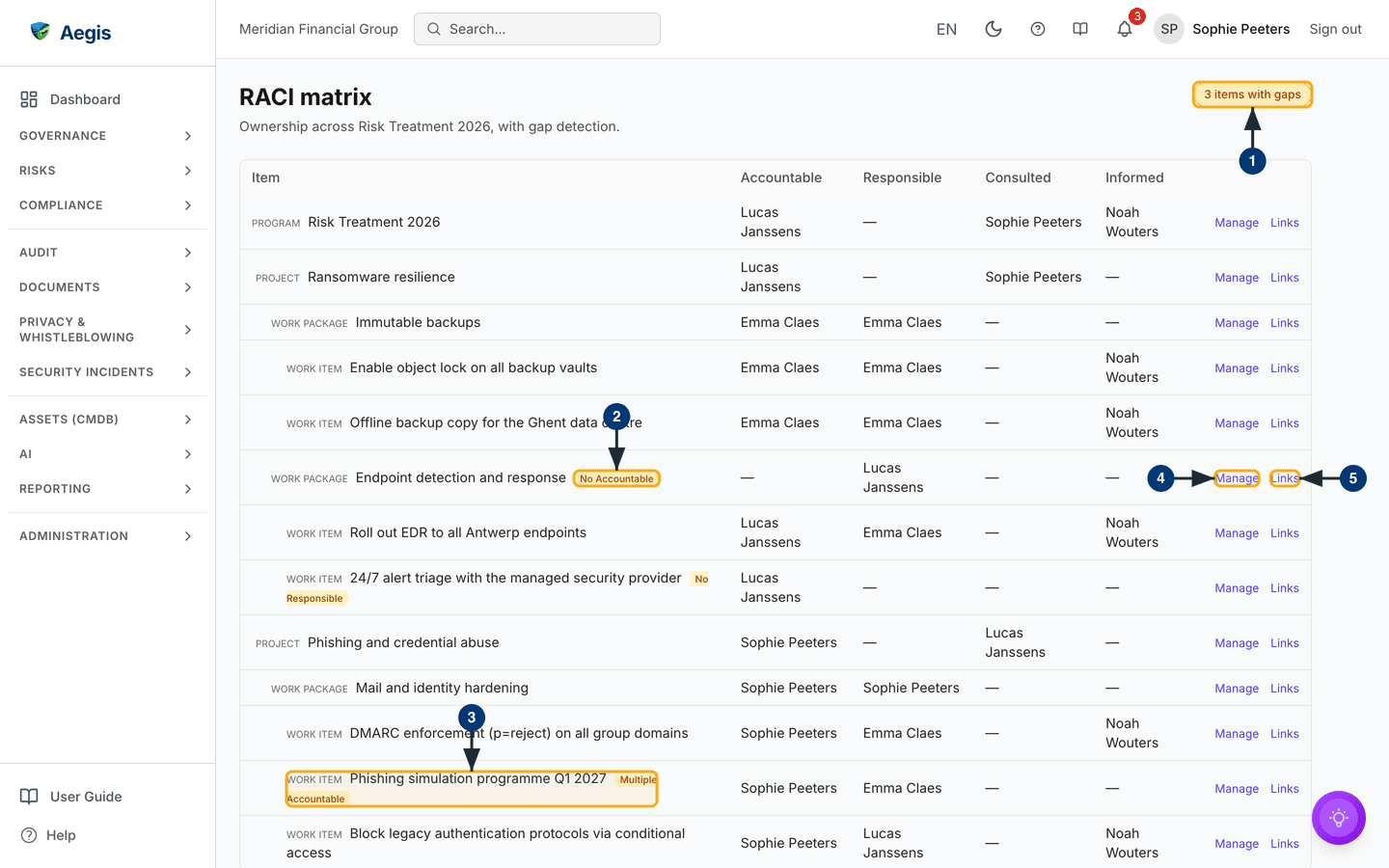
One table answering one question for every piece of a roadmap programme: who is Accountable, who is Responsible, who is Consulted, who is Informed — and where nobody is.
RACI (a way of recording ownership: Responsible does the work, Accountable answers for it, Consulted advises, Informed is kept up to date) is how auditors — and good managers — check that work has owners. The Roadmap organises delivery as programmes containing projects, work packages and work items; this page lays that whole subtree out as one matrix, one row per item, with the four RACI columns beside it. Its real value is gap detection: every item missing an Accountable, every item with more than one Accountable on record, and every work item missing a Responsible, is flagged where you cannot miss it.
Who uses it
-
Viewer
Contributor
Manager
Admin — every role can read the
matrix; the row action shows
Viewwhen you cannot change assignments. The page belongs to the Compliance module, so it is only available where that module is switched on. -
Changing assignments needs two things: a Contributor, Manager or Admin role,
and manage rights on that programme. You have those rights as an
Admin, as the programme's owner, or as a programme member the owner has
given the
Program AdministratororLeadtier. Anyone else — a Manager with no membership on the programme, for example — seesViewinstead ofManage, and the panel opens read-only rather than offering controls that would be refused. -
Governance links follow a slightly wider rule: a programme member with the
Contributortier cannot assign RACI roles but can still add and remove links underLinks. A Viewer sees the links without being able to change them.
How to get there
The page lives at /programs/<programme-id>/raci and has no
entry of its own in the left menu. Three roads lead in:
-
From the Roadmap: on the
Portfoliotab, select theDashboard & membersicon on a programme row. The programme's dashboard opens in a dialog, and its quick links includeRACI, which brings you here. - From a notification: when someone assigns you a RACI role, the notification links straight to this matrix for the programme concerned.
- From a bookmark: each programme has exactly one matrix, so the address can be saved per programme.
What's on this screen
-
The header reads
RACI matrixwith the programme named beneath — on the captured screen, "Ownership across Risk Treatment 2026, with gap detection." To its right sits the verdict pill: greenNo RACI gaps, or an amber count such as the3 items with gapson the captured screen. The count is of items, not of individual gaps. -
Each row is one item of the programme subtree, indented by level and tagged
in small capitals
Program,Project,Work packageorWork item. An amber badge after the item's name names its gap —No Accountable,No ResponsibleorMultiple Accountable. Only work items are checked for a Responsible; programmes, projects and work packages without one carry no badge. -
A
Multiple Accountablebadge means more than one Accountable is on record for that item; theAccountablecolumn then shows only the first of them, so openManageto see them all. The four columns —Accountable,Responsible,ConsultedandInformed— list the assigned people by name; an em-dash means nobody. Accountable shows a single name — Responsible, Consulted and Informed can hold several. -
At the row's end,
Manage(orView) opens the assignment panel for that item. -
Links, beside it, opens the item's governance links — the policies, procedures, controls, risks, vendors and evidence it is connected to.
Assign a role
-
Select
Manageon the row. A panel titledRACI assignments, with the item's name, opens and lists the current assignments grouped under Responsible, Accountable, Consulted and Informed; an empty role readsNone. -
Pick the
Role— Responsible, Accountable, Consulted or Informed — and theUserfromSelect a user…, then selectAssign. The messageRACI role assigned.confirms it, and the person is notified; the notification links them back to this matrix. -
To remove an assignment, select
Removebeside the name. A confirmation asks "Remove name as role?"; confirm withRemove, orCancelto keep it. The matrix and the gap count refresh as you work. - Select
Closeto return to the matrix.
With View, the same panel opens showing the assignments only — no
role and user pickers, and no Remove.
Link governance records
-
Select
Linkson the row. AGovernance linkspanel opens with the records already linked to that item, orNo governance links yet. -
Choose the
Type— Policy, Procedure, Control, Risk, Vendor or Evidence — type a title or name underSearch, pick the record underArtefact, and selectLink. The record joins the list. -
Remove a link with
Unlink. A confirmation asks "Remove this governance link?" before anything changes.
The rules the matrix enforces
| Rule | What happens |
|---|---|
| Exactly one Accountable per item | Assigning Accountable replaces whoever held it — no confirmation step, so check the column first. |
Clearing a Multiple Accountable gap |
Assign the one person who should be Accountable. Every earlier Accountable on that item is replaced in the same step, and the badge clears. |
| A work item keeps at least one Responsible | Removing the last Responsible from a work item is refused with "A work item must keep at least one Responsible assignee." Assign the replacement first, then remove. |
| No duplicate assignments | Assigning someone a role they already hold on that item changes nothing. |
| Every gap is flagged, none is blocked | Aegis flags missing owners but never fills them in — closing a gap is always a person's decision. |
When the matrix does not load
- While the matrix loads, a placeholder table shows under the header.
-
If loading fails, the page shows
Failed to load RACI assignments.with aRetrybutton. - If the programme no longer exists, the page says "This record does not exist or was deleted." with a way back to the Roadmap — there is nothing to retry.
Tips and limits
-
Work the amber pill down to
No RACI gapsbefore an audit or a management review — the matrix is the evidence that ownership exists, and the pill is its summary. - Assignments name people, not job titles. When someone leaves, their rows keep their name until reassigned — an occasional pass over the matrix keeps it honest.
-
The matrix covers roadmap items only. Ownership of policies, risks and
controls lives on those records themselves; use
Linksto hop from a roadmap item to the governed records behind it. - The assignment notification is sent on a best-effort basis: if it cannot be delivered, the assignment still stands, so tell the person directly when it matters.
Where this connects
- Roadmap — where programmes and their subtrees are created and planned, and where the programme dashboard links here.
- Action Items — the day-to-day work surface for what these items produce.
- Governance Bodies — the committees that hold the Accountables to account.